In this mode you can close 3D files that have been opened and created by the program.
The interface for this mode is similar to the "close" tab of the "DB File Management 2D" mode of "The 2D Modes" section of the manual.
From the Graphic Interface
|
|
|
3D Geometry list |
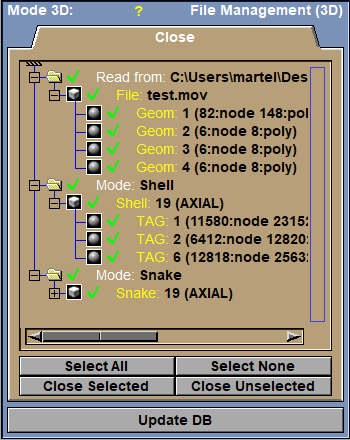
Hierarchical list of all the 3D geometries in sliceO's memory. 3D geometries can come from external files (under the "Read from" groups) or created by sliceOmatic (under the different "Mode" groups).
|
Select All |
Select all the geometries.
|
Select None |
De-select all the geometries.
|
Close selected / unselected |
Close all the selected or unselected geometries.
|
Update DB |
A geometrical object will be created from the contours (either points or lines). These objects can be visualized in the other sliceOmatic modes, or saved to a geometry file (See the File Menu section of The Main Menu and the Shading section of The 3D Tools). |
From the Display Area
There is no Display Area interaction specific to this mode.
From the Keyboard
There is no keyboard interface specific to this mode.
From the Command Line
There are no command lines specific to this mode.