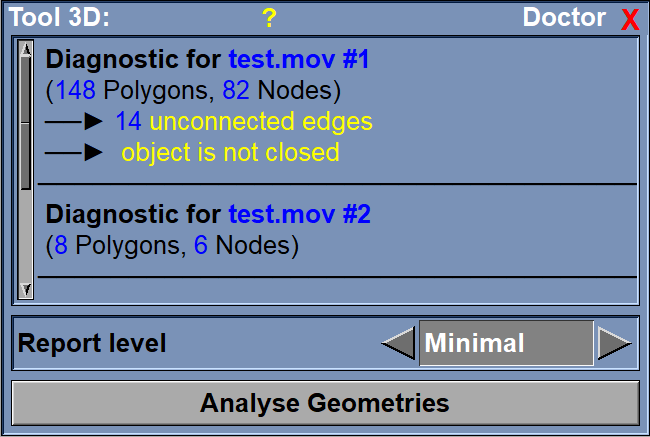
This tool analyze all the selected 3D geometries for problems and inconsistencies.
For each selected geometry, the tool will analyze:
•The polygon connectivity lists. Each polygon is composed of a sorted list of index in the node array. Inversely, sliceOmatic know what polygon access each nodes. This test goes through all the nodes to make sure there is no incoherence: that all references are to valid polygons and that the polygon itself does have a reference to the correct nodes.
•The edges. For a closed surface, each polygon's edges must be shared with one and only one other polygon. So we test if some edges are not correctly shared. Doing this, we can also detect if a polygon is clockwise instead of counter-clockwise.
•The polygon shape. In sliceOmatic, all surface polygons are triangles (any higher degree polygons are split in triangles). We will detect if a polygon is collapsed in a line.
•The node list. The toll will detect if any nodes are unused by the polygons.
•The geometry's volume. A side effect of the way we compute the volumes is that the value will be negative if the geometry's surface is not closed. So we can use the volume to test for the closure of the geometry.
From the Graphic Interface
|
|
|
Report level
|
You can ask for a detail report of the different problems the tool find in the geometry. |
Analyze |
Do the actual analysis.
|
From the Display Area
There is no Display Area interaction specific to this tool.
From the Keyboard
There is no keyboard interface specific to this tool.
From the Command Line
There is no command line or variables associated with this tool.