The Ultrasound "Transfer To TAG"
The US modules work differently than the other sliceOmatic modes. The edition and segmentation done in this module do not automatically propagate to the other modules.
This tool enables you to transfer the segmentation from the US modules to the other sliceOmatic modules.
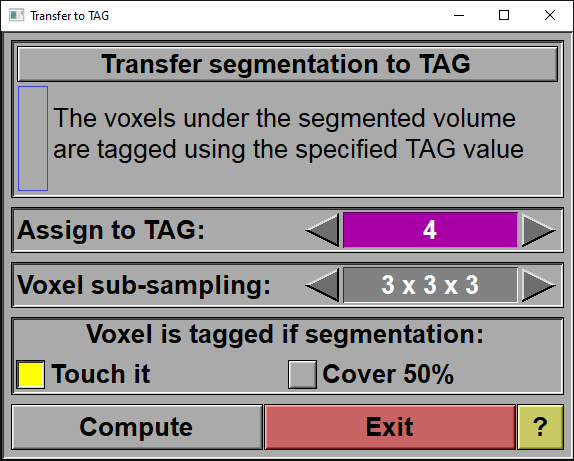
All the voxels that are under the geometry created in the US modules are considered as being part of the segmentation. You can transfer them to any of the available TAG values in sliceOmatic.
From the Graphic Interface
|
|
|
Assign to TAG |
The voxels under the geometry are tagged using the selected TAG value.
|
Voxel sub-sampling |
If the resolution of the slices in sliceO and the volume in the US modules is different, you can sub-sample the pixels in sliceO when computing the transfer. |
Voxel coverage |
If you sub-sample the voxels, you can chose between tagging the sliceO voxel if any of the sample in the US modules is under the geometry, or only tagging the sliceO voxel if more thna half the samples are under the geometry.
|
Compute |
Start the transfer computation
|
From the Display Area
There is no Display Area interaction specific to this tool.
From the Keyboard
There is no keyboard interface specific to this tool.
From the Command Line
System Variables defined in this library:
|
|
$CUDA_TO_TAG_COVER |
(U8) |
Voxel sub-sampling coverage: 0=touch, 1=50% |
|
|
$CUDA_TO_TAG_SAMPLING |
(U8) |
Voxel sub-sampling |
|
|
$CUDA_TO_TAG_TAG |
(U8) |
TAG value used to transfer the segmentation |
Note:
|
|
|