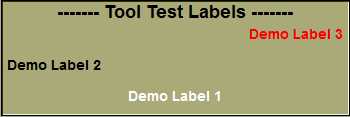
|
...
// --- Interface tools ---
static Boxs box_box ;
static Labels label_demo_1 ;
static Labels label_demo_2 ;
static Labels label_demo_3 ;
// ----------------------------------------------------------------------------
//
// Function: Ctrl_Register
//
// Parameters: mode (unsigned short *) Used only for Tools.
// If this pointer is not NULL,
// use it to specify to what tool
// window we belong.
// SLICEO_TOOL_2D, _BASIC,_3D...
//
// Returns: (int) Vertical size of your menu (in pixels)
//
// This is called once at the start of the program. We need it to
// know you are using your own func. and how much space to reserve
// in the menu interface. You must also change the "mode" flag to
// reflect in what tool window you want to appear.
//
// Note: If you do not need a graphic interface, just comment out
// the "Ctrl_Register" function.
//
// ----------------------------------------------------------------------------
extern "C" __declspec(dllexport) int Ctrl_Register( unsigned short *mode )
{
// --------------------------------------------------------------------
// In the "Config" menu, the user can change the interface's size.
// This action change a number of variables that are used to compute
// the size of the tool in the intearface. We now load a few of these
// variables and use them to compute the dimension of our interface box.
// --------------------------------------------------------------------
short Button_Dim_Big = (short) Fct_Variable_Value( "$INTERFACE_BUTTON_DIM_BIG" ) ;
short Title_Dim = (short) Fct_Variable_Value( "$INTERFACE_TITLE_DIM_BIG" ) ;
short Space_Dim = (short) Fct_Variable_Value( "$INTERFACE_SPACE_DIM" ) ;
// --- compute the height of the interface ---
short height = Title_Dim + 2 // title at top of tool
+ Button_Dim_Big // Label 3
+ Space_Dim // space between box1 and box 2
+ Button_Dim_Big // Label 2
+ Space_Dim // space between box2 and box 3
+ Button_Dim_Big // Label 3
+ Space_Dim ; // space at the bottom
return( height ) ;
}
// ----------------------------------------------------------------------------
//
// Function: Ctrl_Create
//
// Parameters: wnd (HWND) Pointer to Window's created window
// width (int) horiz. size of the window
// height (int) vert. size of the window
// Returns: (int) 0 if error
//
// This is called once when your control window is created
//
// ----------------------------------------------------------------------------
extern "C" __declspec(dllexport) int Ctrl_Create( HWND wnd, int width, int height )
{
char *Title_Font_Name = (char *) Fct_Variable_Value( "$INTERFACE_TITLE_FONT_NAME" ) ;
char *Title_Font_Weight = (char *) Fct_Variable_Value( "$INTERFACE_TITLE_FONT_WEIGHT" ) ;
short Title_Font_Scale = (short) Fct_Variable_Value( "$INTERFACE_TITLE_FONT_SCALE" ) ;
short Border_Dim = (short) Fct_Variable_Value( "$INTERFACE_BORDER_DIM" ) ;
box_box.Name = "------- Tool Test Labels -------" ;
box_box.Flag = OUTIL_DISABLE | OUTIL_NO_3D ;
box_box.Pos_X = 1 ;
box_box.Pos_Y = 1 ;
box_box.Dim_X = width - 2 ;
box_box.Dim_Y = height - 2 ;
box_box.border = Border_Dim;
box_box.color.set( WINDOW_COLOR_TOOL_R,
WINDOW_COLOR_TOOL_G,
WINDOW_COLOR_TOOL_B ) ;
box_box.Font_Name = Title_Font_Name ;
box_box.Font_Scale = Title_Font_Scale ;
box_box.Font_Weight = Title_Font_Weight ;
box_box.Init( wnd ) ;
return( 1 ) ;
}
// ----------------------------------------------------------------------------
//
// Function: Ctrl_Resize
//
// Parameters: wnd (HWND) Pointer to Window's created window
// width (int) horiz. size of the window
// height (int) vert. size of the window
// Returns: (int) 0 if error
//
// This is called once when your control window is created
//
// ----------------------------------------------------------------------------
extern "C" __declspec(dllexport) int Ctrl_Resize( HWND wnd, int width, int height )
{
short p_x, p_y, d_x, d_y ;
// -----------------------------------------------------------------------
// In the "Config" menu, the user can change the interface's size.
// This action change a number of variables that are used to compute
// the size of the tool in the intearface. We now load a few of these
// variables and use them to compute the dimension of our interface tools.
// -----------------------------------------------------------------------
char *Title_Font_Name = (char *) Fct_Variable_Value( "$INTERFACE_TITLE_FONT_NAME" ) ;
char *Title_Font_Weight = (char *) Fct_Variable_Value( "$INTERFACE_TITLE_FONT_WEIGHT" ) ;
short Title_Font_Scale = (short) Fct_Variable_Value( "$INTERFACE_TITLE_FONT_SCALE" ) ;
char *Tools_Font_Name = (char *) Fct_Variable_Value( "$INTERFACE_TOOL_FONT_NAME" ) ;
char *Tools_Font_Weigth = (char *) Fct_Variable_Value( "$INTERFACE_TOOL_FONT_WEIGHT" ) ;
short Tools_Font_Scale = (short) Fct_Variable_Value( "$INTERFACE_TOOL_FONT_SCALE" ) ;
short Button_Dim_Big = (short) Fct_Variable_Value( "$INTERFACE_BUTTON_DIM_BIG" ) ;
short Space_Dim = (short) Fct_Variable_Value( "$INTERFACE_SPACE_DIM" ) ;
short Border_Dim = (short) Fct_Variable_Value( "$INTERFACE_BORDER_DIM" ) ;
if ( wnd ) {
box_box.Pos_X = 1 ;
box_box.Pos_Y = 1 ;
box_box.Dim_X = width - 2 ;
box_box.Dim_Y = height - 2 ;
box_box.border = Border_Dim;
box_box.Font_Name = Title_Font_Name ;
box_box.Font_Scale = Title_Font_Scale ;
box_box.Font_Weight = Title_Font_Weight ;
box_box.Init( wnd ) ;
} else {
wnd = box_box.wnd ;
}
// ===========================================================================
// --- Box 1:
//
// Default FLAG value (=NULL), text color=white.
// ===========================================================================
p_x = box_box.Pos_X + Space_Dim ;
p_y = box_box.Pos_Y + Space_Dim ;
d_x = box_box.Dim_X - 2*Space_Dim ;
d_y = Button_Dim_Big ;
label_demo_1.Name = "Demo Label 1" ;
label_demo_1.Pos_X = p_x ;
label_demo_1.Pos_Y = p_y ;
label_demo_1.Dim_X = d_x ;
label_demo_1.Dim_Y = d_y ;
label_demo_1.border = Border_Dim ;
label_demo_1.Font_Name = Tools_Font_Name ;
label_demo_1.Font_Weight = Tools_Font_Weigth ;
label_demo_1.Font_Scale = Tools_Font_Scale ;
label_demo_1.Init( wnd ) ;
// ===========================================================================
// --- Box 2
//
// text align to the left, color=black
//
// note: the color 0,0,0 is reserved, so we use 1,0,0 for black
// ===========================================================================
p_y += d_y + Space_Dim ;
d_y = Button_Dim_Big ;
label_demo_2.Flag = NAME_LEFT ;
label_demo_2.Name = "Demo Label 2" ;
label_demo_2.Pos_X = p_x ;
label_demo_2.Pos_Y = p_y ;
label_demo_2.Dim_X = d_x ;
label_demo_2.Dim_Y = d_y ;
label_demo_2.border = Border_Dim ;
label_demo_2.color.set( 1, 0, 0 ) ;
label_demo_2.Font_Name = Tools_Font_Name ;
label_demo_2.Font_Weight = Tools_Font_Weigth ;
label_demo_2.Font_Scale = Tools_Font_Scale ;
label_demo_2.Init( wnd ) ;
// ===========================================================================
// --- Box 3
//
// text align to the right, color=red
// ===========================================================================
p_y += d_y + Space_Dim ;
d_y = Button_Dim_Big ;
label_demo_3.Flag = NAME_RIGHT ;
label_demo_3.Name = "Demo Label 3" ;
label_demo_3.Pos_X = p_x ;
label_demo_3.Pos_Y = p_y ;
label_demo_3.Dim_X = d_x ;
label_demo_3.Dim_Y = d_y ;
label_demo_3.border = Border_Dim ;
label_demo_3.color.set( 255, 0, 0 ) ;
label_demo_3.Font_Name = Tools_Font_Name ;
label_demo_3.Font_Weight = Tools_Font_Weigth ;
label_demo_3.Font_Scale = Tools_Font_Scale ;
label_demo_3.Init( wnd ) ;
return( 1 ) ;
}
// ----------------------------------------------------------------------------
//
// Function: Ctrl_Draw
//
// Parameters: (void)
// Returns: (int) 0 if error
//
// This is called each time your menu has to be re-drawn
//
// ----------------------------------------------------------------------------
extern "C" __declspec(dllexport) int Ctrl_Draw( HWND wnd )
{
// --- if the window if off or invible, we can get out ---
if ( ! Flag_Ctrl_Wnd_On )
return( 1 ) ;
if ( ! Flag_Ctrl_Visible )
return( 1 ) ;
box_box.Draw() ;
// --- We draw each of our 3 labels ---
label_demo_1.Draw() ;
label_demo_2.Draw() ;
label_demo_3.Draw() ;
return( 1 ) ;
}
...
|