All the tools classes are derived from the same "Tools" parent class.
This class has the following variables:
|
|
long Flag |
This flag control the appearance of the tool. Some of the bits are common to all tolls: OUTIL_INVISIBLE // no graphics OUTIL_DISABLE // no select (but graphics OK) OUTIL_VERTICAL OUTIL_EMPTY // no fill OUTIL_OUTLINE // border as blue outline OUTIL_NO_3D // flat fill OUTIL_NO_BORDER // do not draw the outside box
OUTIL_OUT = (OUTIL_DISABLE|OUTIL_INVISIBLE|OUTIL_OUTLINE)
and others are specific for certain tools (they will be discussed in each tool's sections.)
|
|
|
char * Name |
This variable contain the name of the tool. It can be NULL if no name is to be displayed. If you do specify a name, you can assign it directly to the variable, or use the SetName method. Be sure to allow enough space to display the name when you specify the dimensions of the tool. The position of the name inside the tool can sometime be modified with the flag values: NAME_V_CENT NAME_TOP NAME_BOTTOM NAME_H_CENT NAME_LEFT NAME_RIGHT
|
|
|
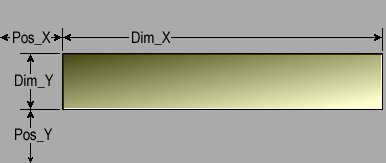
short Pos_X short Pos_Y short Dim_X short Dim_Y
|
|
|
|
short border
|
This variable control the size of the border of the tool. The border size used by sliceO-5 can be found in the variable $INTERFACE_BORDER_DIM
|
|
|
char *Name char *Font_Name char *Font_Weight char *Font_Slant short Font_Scale
|
These variable give a name to the tool and control the appearance of that name. In sliceO-5, these values are found in the variables: "$INTERFACE_TITLE_FONT_NAME", "$INTERFACE_TITLE_FONT_WEIGHT", "$INTERFACE_TITLE_FONT_SCALE" for the title of the modes and tools, and in "$INTERFACE_TOOL_FONT_NAME", "$INTERFACE_TOOL_FONT_WEIGHT", "$INTERFACE_TOOL_FONT_SCALE" for the tool's fonts, |
|
|
Colors color
|
This variable give the color of the tool. The "Colors" class is described here.
|
|
|
short clip_x short clip_y short clip_h short clip_w
|
These optional variables are used to limit the drawing area of the tool. They are useful if the graphic window is smaller than the space needed to draw the tool. We will usually use the window's dimensions for the clip values. |
|
|
unsigned long *Graph_Select unsigned long *Graph_Normal |
These variable contain pointers to the pixel data needed to fill the tool when it is selected and when it is not. The pixel data is RGB values stored in 32 bits integers. If you do not override these pointers with your own image data, the default background it will be created during the "Init" method. |
All the tools share a set of common methods:
|
|
void Init( HWND window=NULL ) ; |
|
|
|
void Draw( void ) ; |
|
|
|
int Select( int click ) ; |
|
|
|
void Deselect( void ) ; |
|
They also inherit these methods from the parent class:
|
|
int Alloc_Graph_Select( unsigned long start_value=COLOR_INV_RED ) ; int Alloc_Graph_Normal( unsigned long start_value=COLOR_GREY ) ; |
|
|
|
void Clear( void ) ; void Clear( Colors color ) ; |
|
|
|
void Set_Color( unsigned char r, unsigned char g, unsigned char b ) ; |
|
|
|
int Set_Name( char format[], ... ) ; |
|
Most tools will also have a "read" and "Scroll" methods, but the syntax for these method change from class to class. For example the "Read" for a buttons return an integer (1 for on and 0 for off) while the "Read" for a valuators return a float.